When editing video, many of us want to just upload our assets into Premiere and get started. But wait just a minute. There are a few steps you should take to manage those files. First it minimizes file loss. Second, you can locate your files. Third, you won’t confuse Premiere. Fourth, you won’t confuse yourself.
In the field
If possible, back up your video or photo files immediately after you shoot. I like to keep my laptop in my car and back up my footage to an external hard drive as soon as I finish. Technically, I’ll drive do the nearest gas station and do it there so that the farmer I just interviewed doesn’t think I’m a weirdo, but you get what I’m saying. At this point, I’m not too picky about my filing structure. I’ll take care of that at the office.
Back at the computer
On your computer or a hard drive (ideally both), create a folder that’s in a place where you can remember it. Below is a screenshot of my external drive. His name is Elvis (all my externals are named. I’m not weird!).
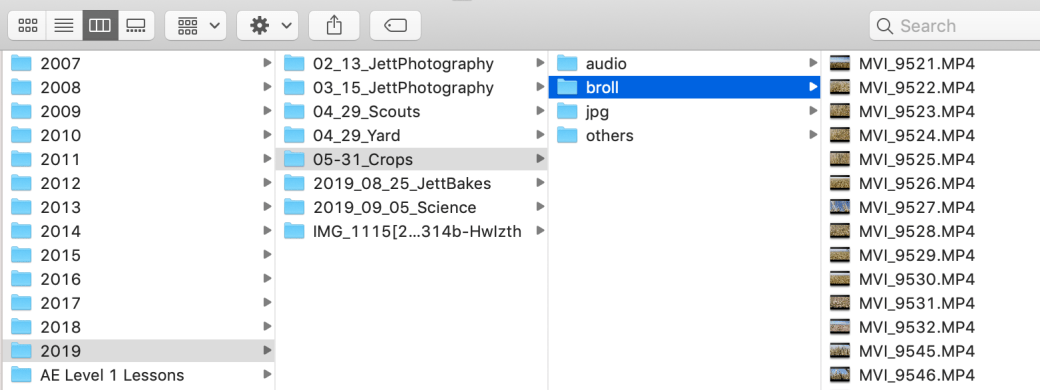
You should have an individual folder for every project you edit. I sort my projects by year. Because I think chronologically, I name my projects with the date first, then project name. Notice, I have the single digit months as 01, 02, etc. That’s because when I get into double digit months, the computer will put October in front of January, and will give my chronological brain fits. I did the same for days and months. So, 09_05_Science. That project was shot on September 5, 2019.
Additional organization
From there, I sort out my project files by type. I have a folder for audio, one for b-roll, one for photos, and a file for other stuff if needed. I may make extra folders. For example in one project I had lots of interviews, so I separated those into their own folder. In general, I’ll keep my voice track and music in the audio folder. Sometimes I’ll call jpgs photos. That all depends on if I shot photos in camera raw or not (If I do, I’ll convert them to jpgs for video editing).
But why?
This isn’t because I’m trying to bring Marie Kondo into my video production (her influence is heavy in my closet and dresser). I was doing this long before I organized my clothes. Like our clothes, our video production files can be all over the place: sock in the living room, jeans in the closet, photo on the desktop, music in iTunes. When you’re in a hurry and need that sock – I mean file – you’re probably not going to remember where you left it. By spending an extra two minutes on the front end, you’ll probably save an extra 10 minutes when you’re trying to finish a project.
Another reason: Premiere is happier when your files are tidy. When your files are organized, you can open a Premiere project, and import your b-roll folder, then your audio folder, and so on. Need to add more songs to your project? Easy. Just add them to the audio folder on your drive, then upload to Premiere. When Premiere pulls files from one place, it doesn’t have to work as hard. And as you’re editing, your files are pre-sorted and easier to find. Plus, I find it’s easier to edit when my files are in bins with just a handful of files. I can scroll through them faster.
Another reason: I run into this issue with students a lot. Let’s say that a friend gave you some photos to use in a project on a jump drive. You plug it in, import it to Premiere, edit your project, save, return the jump drive, give the jump drive back. As soon as you take that jump drive out of the computer, Premiere can’t find it and will leave an ugly hole in your project. Usually this can be fixed by plugging the jump drive back in, but what if your friend left town with her jump drive? Now you have to go find different pics. It could have been fixed by putting the image in the photos folder in the first place. I equate this to a broken link on a website. The computer simply can’t find the file that you had once placed there.
Be awesome
The most efficient and effective editors adopt some file management system. Mine may not work for you, but create SOMETHING that you and your team can understand. Again, a few minutes at the front will save a lot of time and stress (and bad words) when you’re crunching to finish a project.
Happy editing! And tidy up!
 Erica irlbeck